Quick Scan
Junk gone in seconds.
Security
DiskDuo reads the protections macOS already has — System Integrity Protection, Gatekeeper, FileVault, the firewall, XProtect — and says plainly which are on. It lists what starts by itself, which apps can see your screen or read every file, and what your browser extensions can reach.
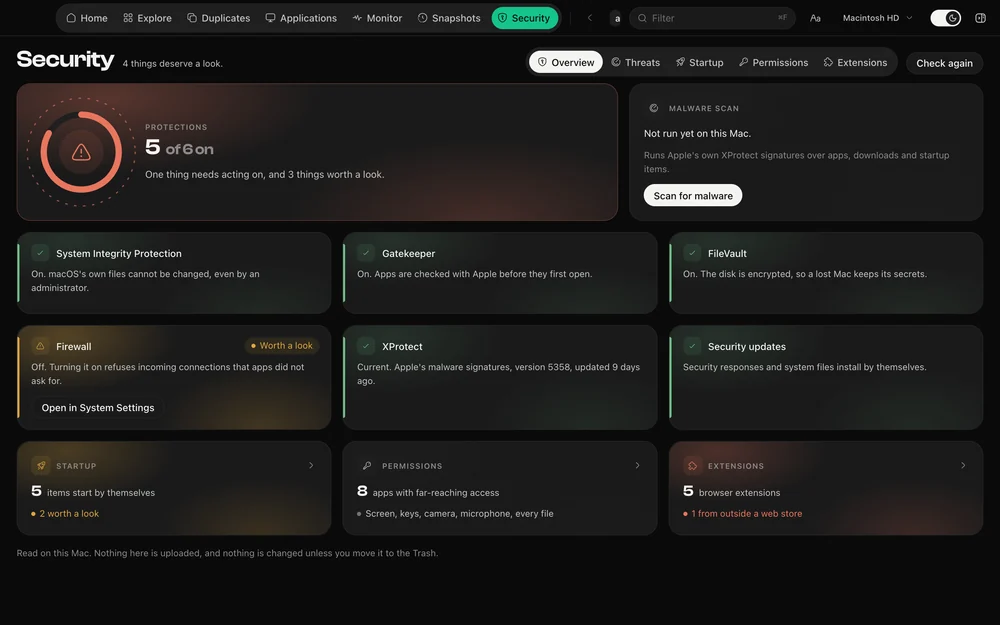
Six checks, read from the system itself: System Integrity Protection, Gatekeeper, FileVault, the application firewall, XProtect and whether security responses install by themselves. Each one says what it means for this Mac in a sentence, and offers the System Settings pane that changes it.
Login items, background agents and system daemons, merged from the task list macOS keeps and the launch property lists on disk. Each is judged by where its program lives and who signed it: leftovers pointing at programs that are gone are called out, and so is anything running from a temporary or hidden folder.
The permissions macOS asks you about — full disk access, screen recording, input monitoring, camera, microphone, automation — with the apps that hold each one. Reading them needs Full Disk Access, and DiskDuo says so rather than showing an empty list.
Extensions across Chrome, Brave, Edge, Arc, Vivaldi, Opera, Chromium, Firefox and Safari, with what each can actually reach. The ones that can read and change every site you visit are marked, and so are the ones installed from outside a web store.
Questions
No. It reads the protections macOS has and runs Apple’s own malware signatures on demand. It does not sit in the background watching every file, and it does not claim to.
macOS keeps those lists where only apps with Full Disk Access can read them. Without it DiskDuo says the list cannot be read, rather than showing nothing as though nothing were granted.
The rest of it
Junk gone in seconds.
What your coding tools are really using.
Nothing goes until you say so.
Apple's own signatures, run on demand.
Identical to the byte, or not at all.
Uninstall, with everything left behind.
What your Mac is doing, right now.
One payment, no subscription. Signed and notarized by Apple.