Agents
What your coding tools are really using.
Quick Scan
Most people open a disk cleaner wanting space back, not a map. Quick Scan looks only where junk collects — caches, logs, build output, Xcode derived data, and the caches six package managers keep — and is done in about five seconds. Then one button clears it.
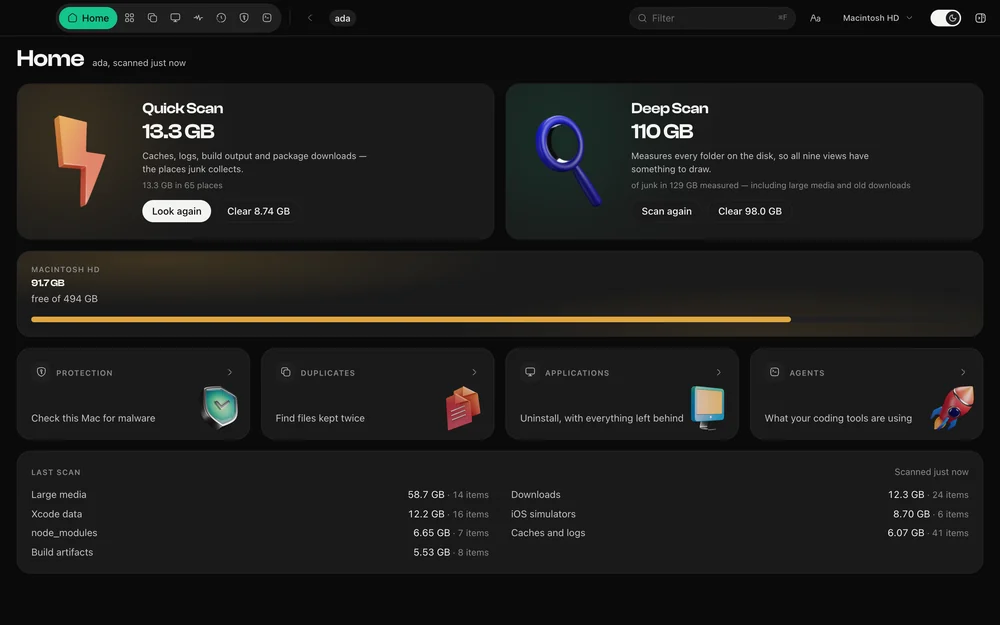
A full scan measures every folder on the disk, which is right when the question is where your space went and slow when the question is get rid of the rubbish. Quick Scan walks a few dozen known places instead: ~/Library/Caches and Logs, Xcode derived data and archives, iOS device support, and the caches npm, pnpm, Yarn, Bun, Homebrew, Cargo and Gradle keep.
The first version took thirty-five seconds, which is not quick by any reading of the word. Sharing the work across threads brought it to fifteen, and sharing the directory walk itself — a package cache is one row to read but a million files to the filesystem — brought it under five.
Every path goes through the same safety rules as any other removal, before it is even offered rather than only before it is removed. What it finds is listed with sizes, and it goes to the Trash, where you can put it back.
Questions
Quick Scan looks only in the places junk collects and takes seconds. Deep Scan measures every folder on the disk so the nine views have something to draw, and finds the things only a full measure can — large media, old downloads and node_modules.
Apps rebuild caches when they need them, so clearing them costs time rather than data. DiskDuo still shows you every item first and moves it to the Trash rather than deleting it.
The rest of it
What your coding tools are really using.
Nothing goes until you say so.
A check-up for the rest of your Mac.
Apple's own signatures, run on demand.
Identical to the byte, or not at all.
Uninstall, with everything left behind.
What your Mac is doing, right now.
One payment, no subscription. Signed and notarized by Apple.