Quick Scan
Junk gone in seconds.
Monitor
Processor, memory, network and disk, measured every second and drawn beside the last ninety, so a spike reads as a spike. The menu bar keeps free space in view, with the same figures a click away.
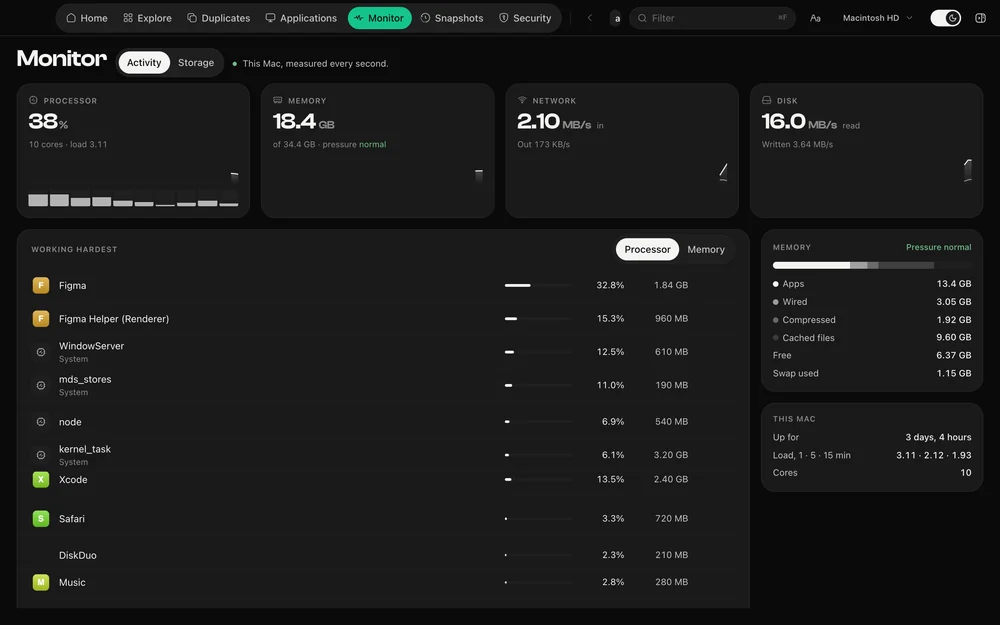
Every figure is a level or a rate from a second ago, drawn beside the last minute and a half of the same figure. A number alone cannot tell you whether something is climbing; a line can.
The storage view shows what is growing right now, folder by folder, and how free space has moved over the last days — which is how you catch a runaway log or a download you forgot.
Free space sits in the menu bar with a ring that fills as the disk does. The popover opens above whatever you are working in, including a full-screen app, and closes when you click away.
Questions
It samples once a second while it is open and stops when it is not. The menu bar item reads free space every few seconds and nothing else.
The rest of it
Junk gone in seconds.
What your coding tools are really using.
Nothing goes until you say so.
A check-up for the rest of your Mac.
Apple's own signatures, run on demand.
Identical to the byte, or not at all.
Uninstall, with everything left behind.
One payment, no subscription. Signed and notarized by Apple.