Quick Scan
Junk gone in seconds.
Cleanup
Stage what you want gone and review the list: what each item is, where it came from, and what it frees. Then it goes to the Trash, never straight off the disk. The parts of macOS that must not be touched cannot be staged at all.
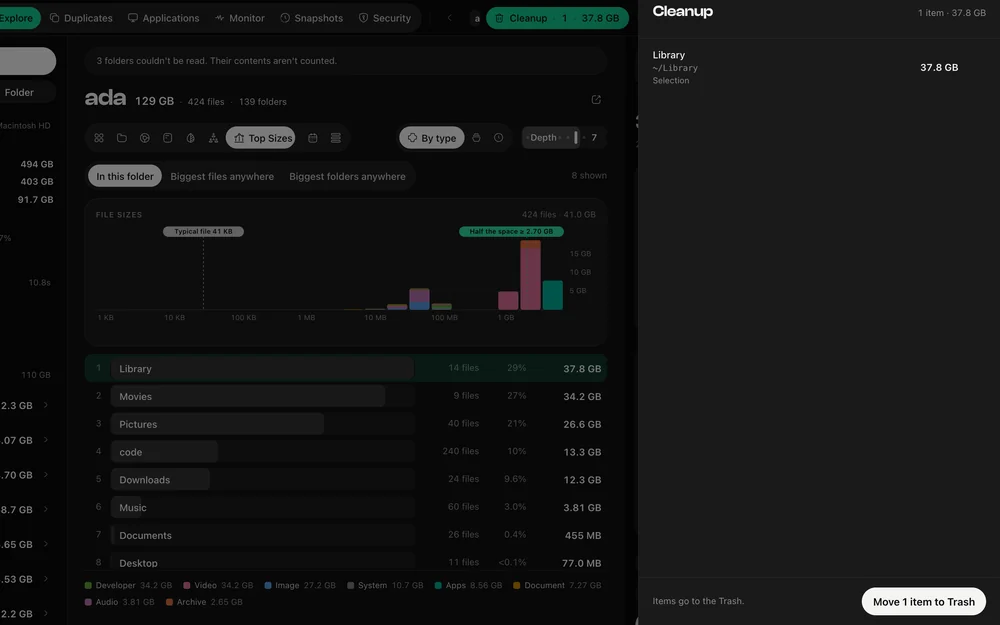
Easy Wins gathers the places that fill up on their own: Downloads, caches and logs, iOS simulator runtimes, node_modules, build output, Xcode derived data, package manager caches, large media and the Trash itself. Each one is measured from your own scan, so the figures are yours rather than an average.
A folder that matches a category claims everything inside it, and the walk does not descend further. A video inside Downloads is counted once, under Downloads. That is why the category totals add up to what you actually get back.
Staging is not deleting. The sheet shows every path, its size and where it was staged from, and each one is checked again in the engine at the moment you confirm — not in the interface, where a bug could be talked around.
Removal means macOS’s own Trash, through the same call Finder makes, so it can be put back. There is no "delete immediately" default and no shortcut for it.
System paths, the volume root, your home folder itself and DiskDuo’s own data cannot be staged, however they are reached — through a view, the palette, a search or a keyboard shortcut.
Questions
Usually, yes: applications rebuild their caches. DiskDuo still shows you which app each cache belongs to and how big it is, and everything goes to the Trash, so a cache you needed can be put straight back.
Removing a cache or a log will not. Removing an application’s support data can reset its settings, which is why those are shown separately, with the reason each file was matched to the app.
The rest of it
Junk gone in seconds.
What your coding tools are really using.
A check-up for the rest of your Mac.
Apple's own signatures, run on demand.
Identical to the byte, or not at all.
Uninstall, with everything left behind.
What your Mac is doing, right now.
One payment, no subscription. Signed and notarized by Apple.